Features
Everything in TMR.
A planner, habit tracker and goal companion in one calm app, with Apple Health, calendars, iCloud, widgets and Siri when you want them.
Planner
Today and Tomorrow, side by side.
Your day on one screen: the priority at the top, scheduled tasks in order, and habits right underneath.
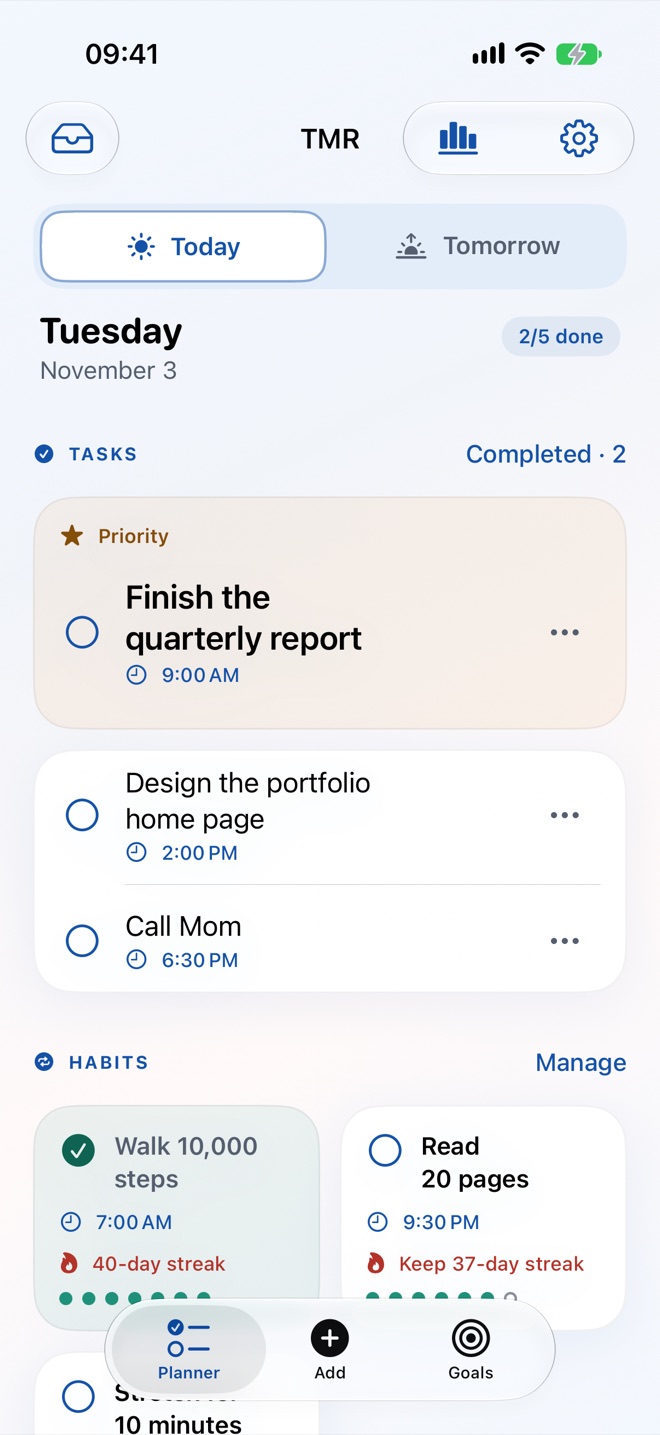
- Today and Tomorrow views with a one-tap switch.
- One priority a day, pinned at the top of the plan.
- Scheduled times and alerts for tasks that need them.
- Later for ideas that don’t belong to this week.
- Rollover help: unfinished tasks carry forward, and TMR asks about the ones that keep slipping.
Evening review
Ten minutes tonight. A ready plan tomorrow.
A guided routine closes today and prepares tomorrow, so mornings start with a decision already made.
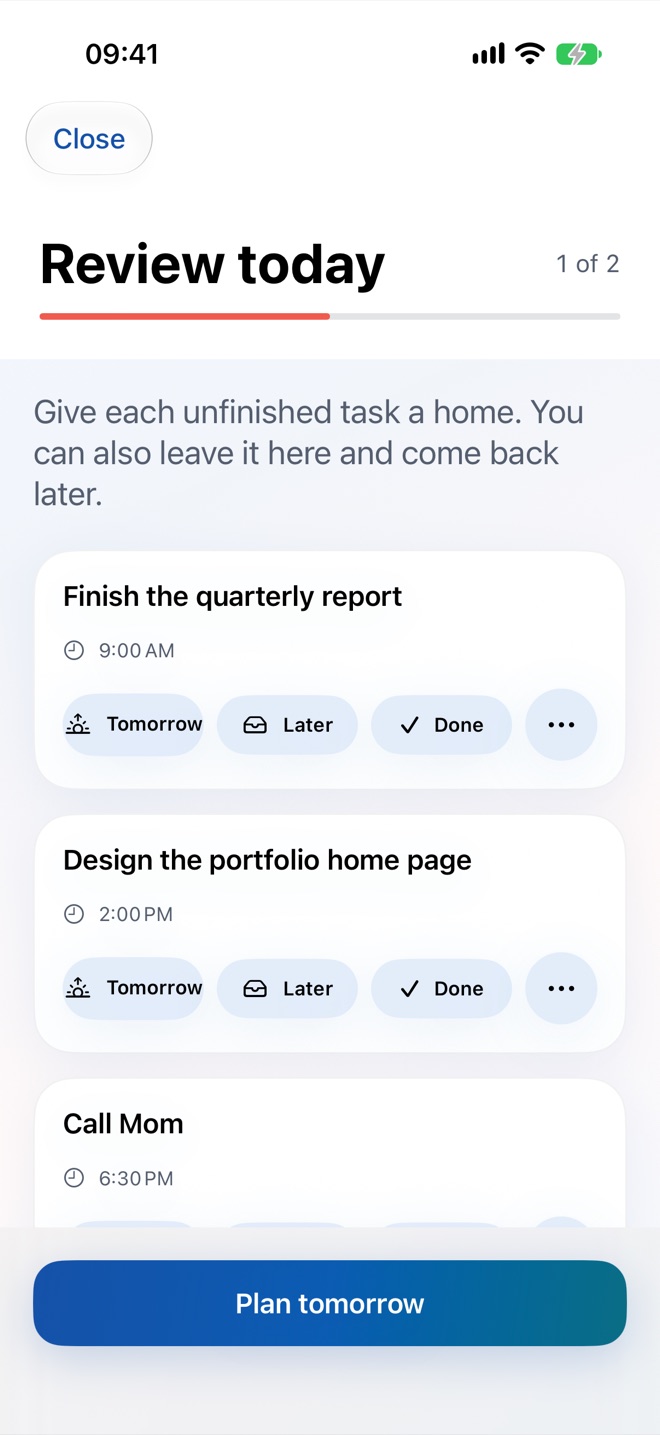
- Give every unfinished task a home: Tomorrow, Later, Done or delete.
- Choose tomorrow’s priority and add times only where they’re real.
- One quiet evening reminder at the time you choose.
- An empty day can be a complete plan. TMR never invents busywork.
Habits
Habits on the days you mean.
Schedule habits on specific weekdays with a preferred time, and check them off next to your tasks.
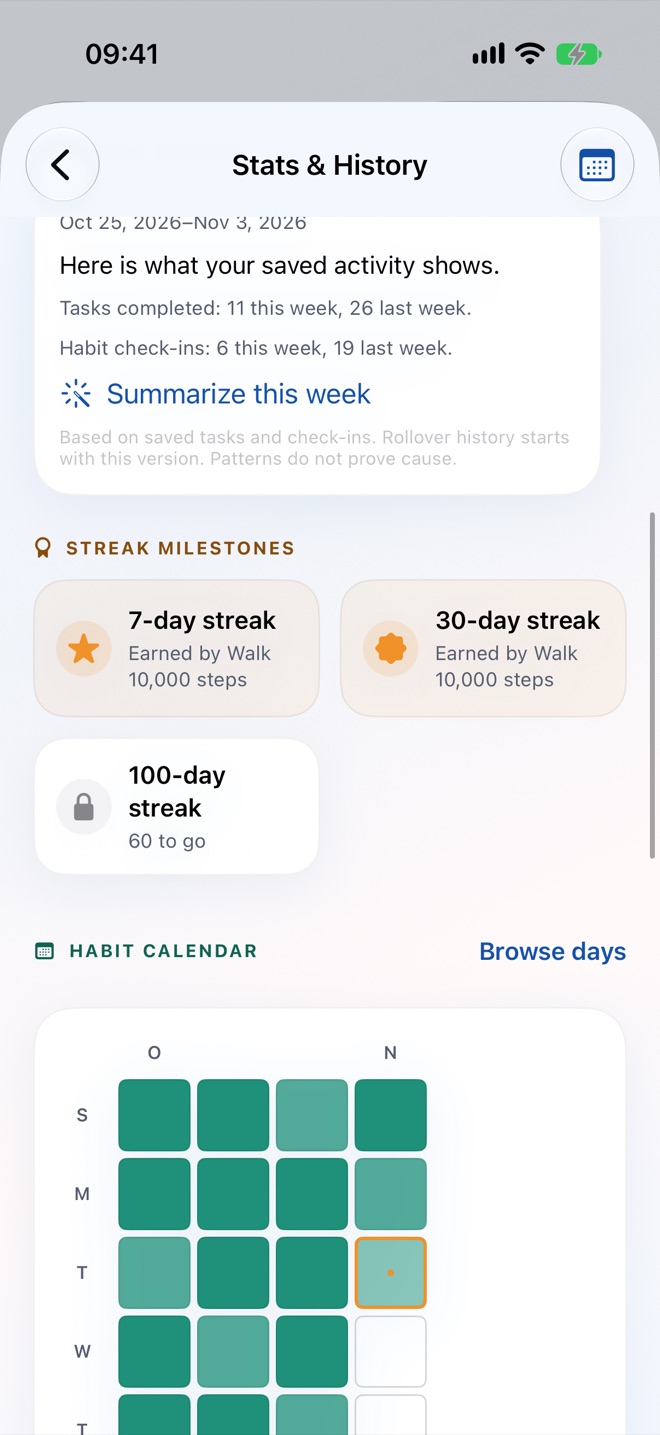
- Weekday schedules: streaks count only the days a habit is planned.
- Habit calendar heatmap, so a missed day doesn’t erase a good month.
- Current and best streaks with milestones at 7, 30 and 100 days.
- Link habits to goals so every check-in counts toward something bigger.
- Archive habits that have become automatic.
Streaks
Count the things that aren’t on a schedule.
Simple daily check-ins for anything you want to keep going: morning pages, no sugar, practicing a language.
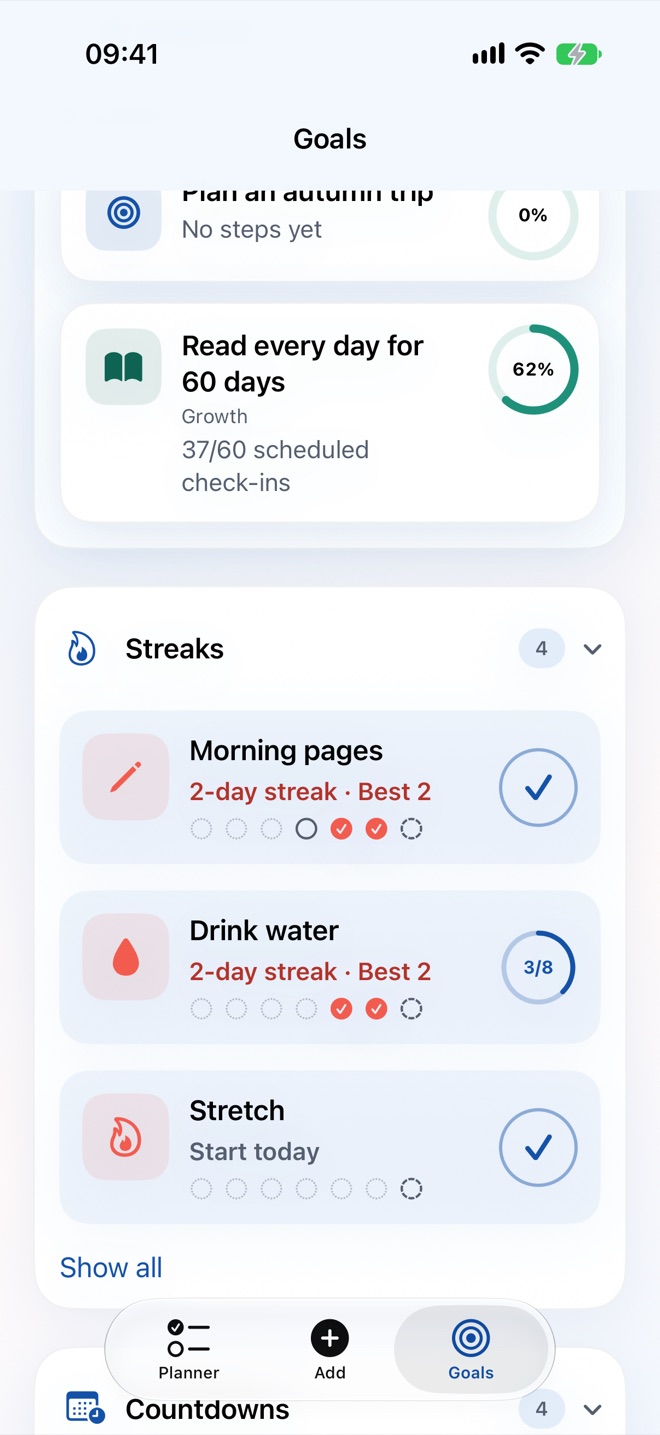
- One-tap check-ins with a short history row on every tracker.
- Daily targets such as eight glasses of water, with a progress ring.
- Icons, notes and milestone markers for each streak.
Goals
Goals that show real progress.
Three goal types match how goals really move, and the next step is always one tap from tomorrow’s plan.
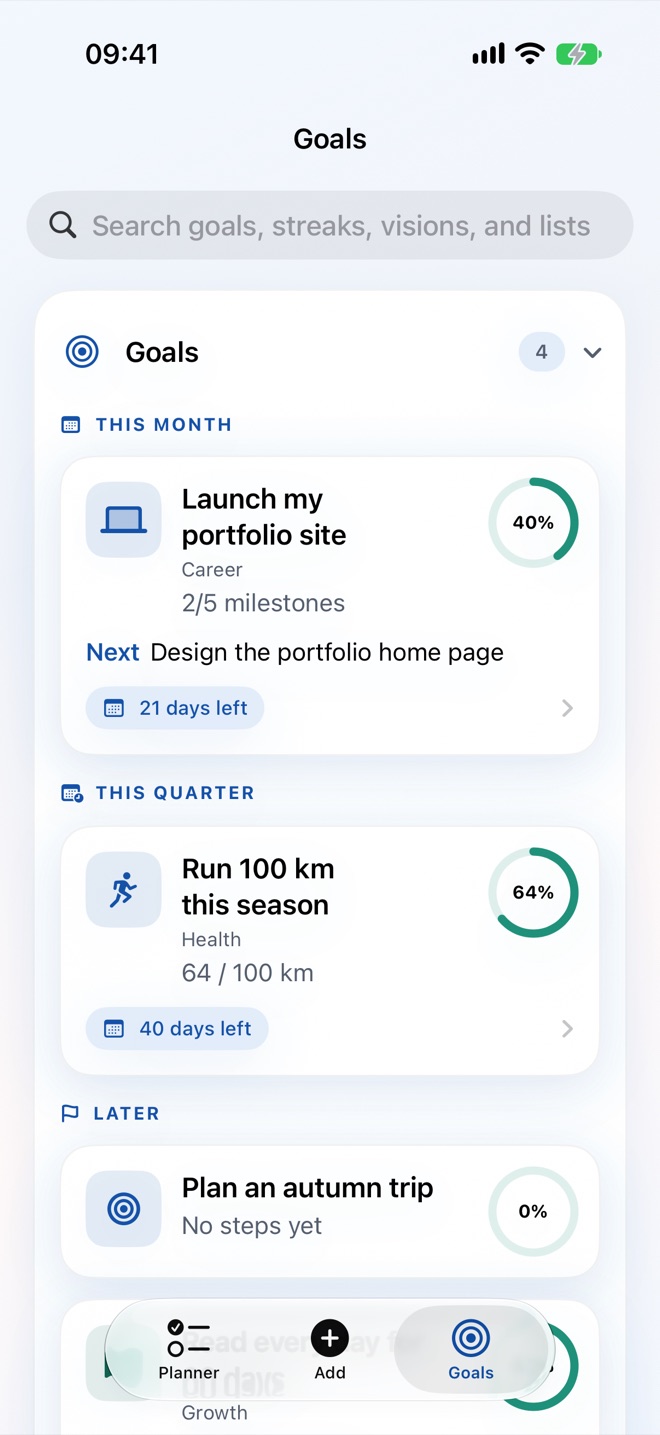
- Milestone goals with steps and linked tasks.
- Numeric goals with a target and unit, like 100 km or $3,000.
- Habit-linked goals measured by your streak.
- Target dates and days left, grouped by this month, this quarter and later.
- Stalled-goal hints and celebrations at progress milestones.
Vision board
A vision board you’ll actually see.
Pick photos, add a caption, and link each one to a goal, so the why sits right next to the plan.
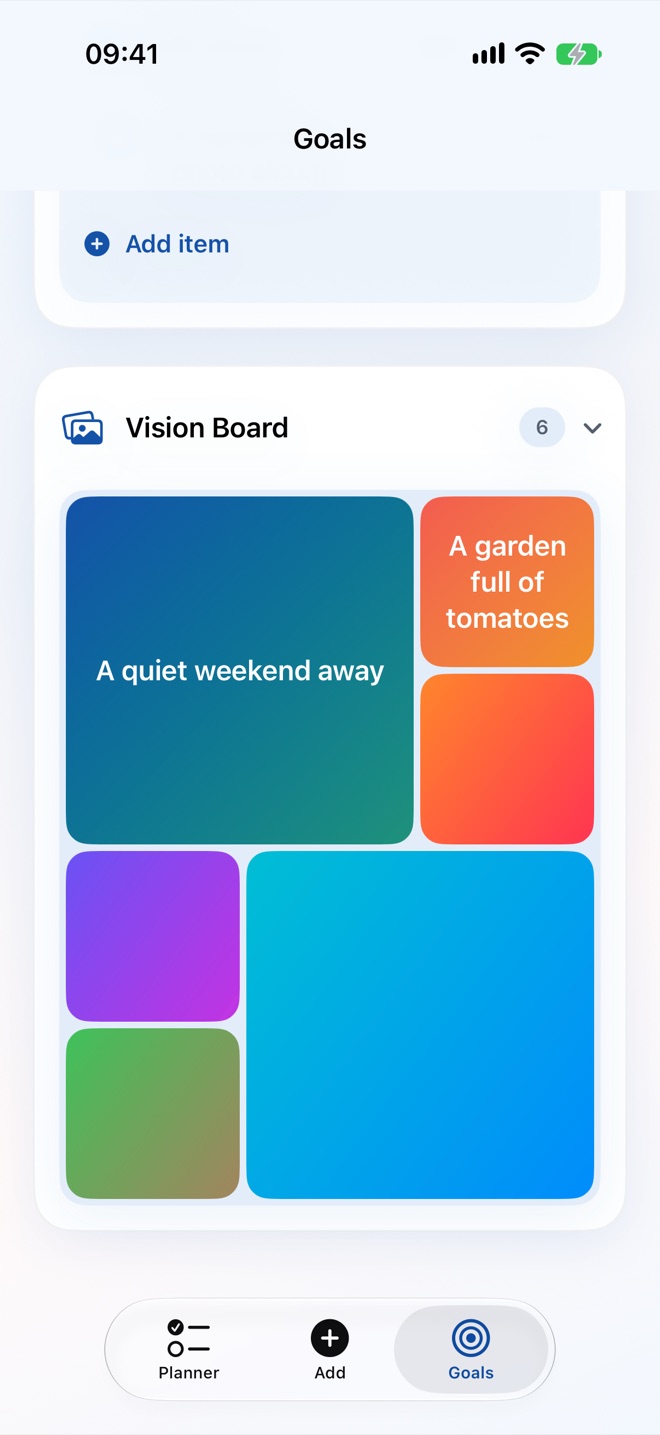
- Photos from your library, arranged in a mosaic.
- Link items to goals to see their progress on the board.
- Archive dreams you’ve achieved and look back on them.
Countdowns
Count down to what’s coming.
Trips, birthdays, deadlines and anything else worth looking forward to.
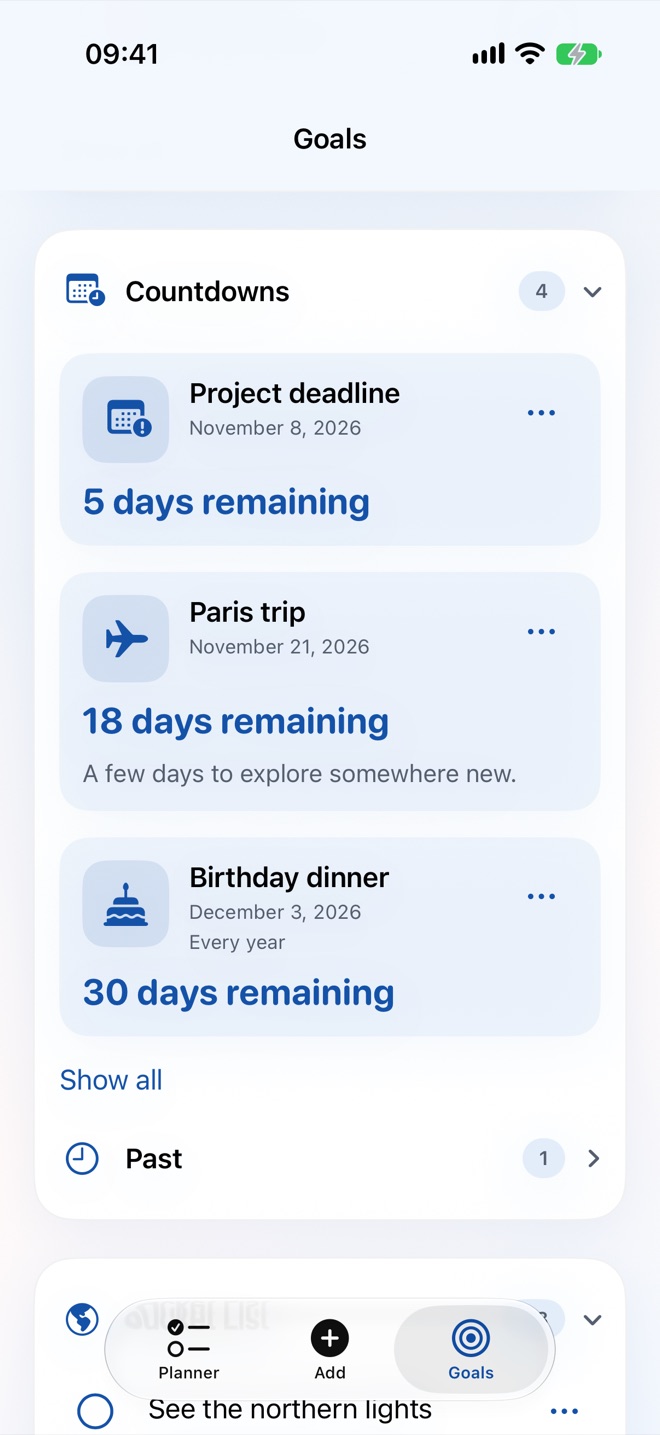
- Days remaining at a glance.
- Yearly repeats for birthdays and anniversaries.
- Past events move to their own list automatically.
Bucket list & lists
Somewhere for everything else.
A bucket list for big dreams and simple lists for books, movies and gift ideas.
- Bucket list with notes and a Done archive.
- Starter lists: Books to read, Movies to watch, Gift ideas.
- Create your own lists with icons.
Stats & history
See how consistent you really are.
Honest numbers about your planning, habits and tasks, plus a weekly insight in plain language.
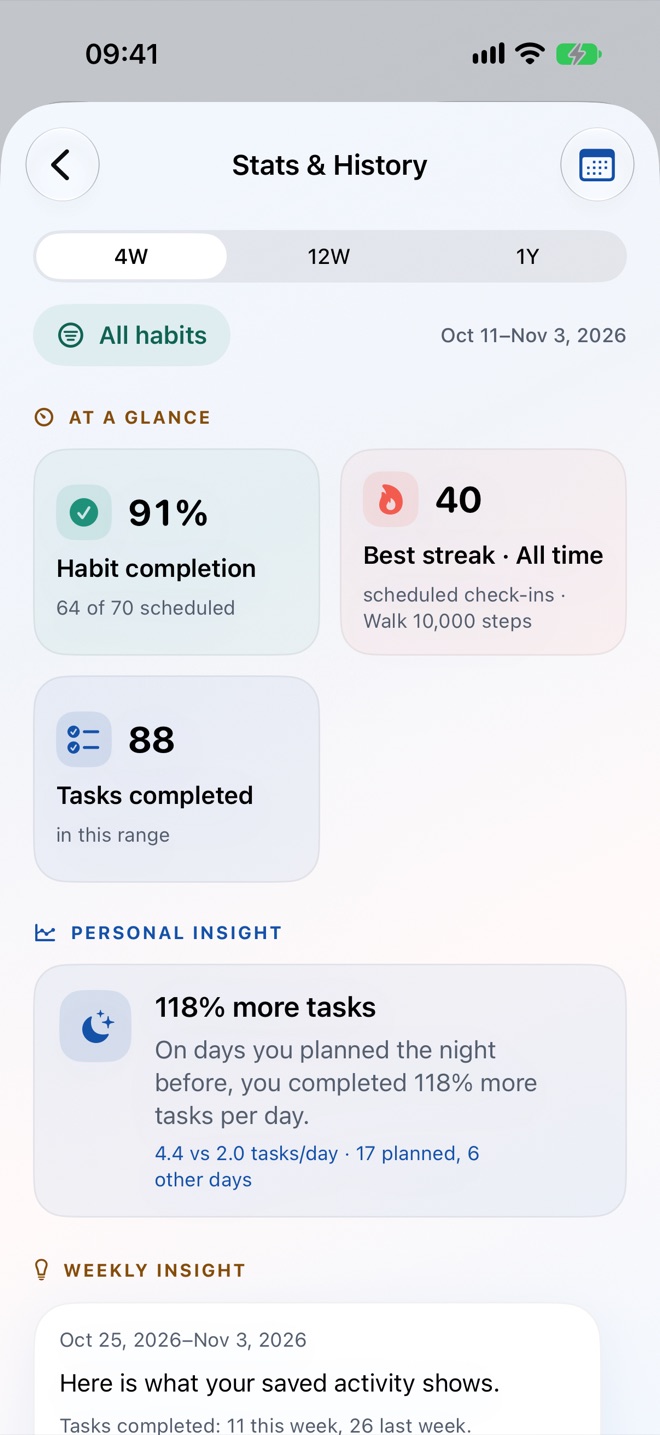
- At a glance: habit completion, best streak and tasks completed.
- Personal insight comparing days you planned the night before with other days.
- Habit calendar and a day-by-day history browser.
- Ranges of 4 weeks free, and 12 weeks or a full year with Plus.
Apple HealthPlus
Habits that tick themselves off.
Connect habits and goals to Apple Health, and your iPhone and Apple Watch do the logging.
- Automatic habits: “Walk 10,000 steps” completes when you pass the target.
- Self-filling goals: “300,000 steps this month” adds up from your start date.
- Steps, walking and running distance, exercise minutes, active energy, mindful minutes and sleep.
- TMR asks only for the data types you use, and only reads. It never writes to Health.
- You can still check a habit off by hand.
Calendar syncPlus
Your plan and your calendar, in sync.
Two-way sync between TMR and your calendars, after you give permission.
- Apple Calendar, and Google Calendar through your iPhone’s Calendar accounts.
- Scheduled tasks appear in a dedicated TMR calendar; move one there and TMR follows.
- See your meetings next to your tasks while you plan tomorrow.
- Choose which calendars TMR can see. It only writes to its own calendar.
iCloud syncPlus
Every device, the same plan.
Your tasks, habits, goals and vision board stay in step across iPhone and iPad.
- Uses your private iCloud database. We can’t read it.
- Works offline and catches up when you’re back online.
- Turn it on or off in Settings.
Widgets
Your plan on the Home Screen.
Today and Tomorrow widgets show your priority, tasks and habits at a glance.
- Interactive with Plus: check off tasks and habits right from the widget.
- Home Screen and Lock Screen sizes.
- The Tomorrow widget shows whether your plan is ready.
Siri & ShortcutsPlus
Plan by voice.
Add tasks, check off habits and open tomorrow’s plan with Siri, or build your own automations.
- “Add a task to TMR for tomorrow.”
- App Shortcuts work out of the box. No setup needed.
- Use TMR actions in the Shortcuts app.
Focus timerPlus
Start the priority, not the inbox.
Start a focus session on any task and keep an eye on it from the Lock Screen and Dynamic Island.
- Live Activity on the Lock Screen and Dynamic Island.
- Pick a session length that fits the task.
- Mark the task done when the session ends.
Repeating tasks & remindersPlus
The routine runs itself.
Set tasks to repeat and get a gentle nudge at each habit’s preferred time.
- Repeat daily, on chosen weekdays, weekly or monthly.
- Each repeat appears on its day, and history stays accurate.
- Habit reminders at the time you prefer, only on scheduled days.
On-device Apple IntelligencePlus
Help that stays on your iPhone.
Optional helpers powered by Apple Intelligence, running on your device.
- Interpret with AI: type “call the dentist tomorrow at 4” and get a task with a time.
- Suggest smaller steps when a goal or task feels too big.
- Suggest a plan for tomorrow during the evening review. Nothing changes until you approve it.
- Needs a device that supports Apple Intelligence, with it turned on.
Privacy
No accounts. No ads. No tracking.
TMR is designed so your plans stay yours.
- Data lives on your device and, if you choose, your private iCloud.
- No third-party analytics or advertising SDKs.
- Delete everything at any time. See how.
Free and TMR Plus
What’s included.
| Feature | Free | TMR Plus |
|---|---|---|
| Today & Tomorrow planner, priority, evening review | Included | Included |
| Habits | 3 active | Unlimited |
| Active goals | 1 | Unlimited |
| Streaks, countdowns, bucket list, lists, vision board | 3 of each | Unlimited |
| Stats & history | Last 4 weeks | 12 weeks and 1 year |
| Home Screen widgets | Included | Interactive |
| Apple Health habits and goals | — | Included |
| Apple & Google Calendar sync | — | Included |
| iCloud sync across devices | — | Included |
| Siri, Shortcuts and focus timer | — | Included |
| Repeating tasks and habit reminders | — | Included |
| On-device Apple Intelligence | — | Included |
TMR Plus is an optional auto-renewing subscription, billed monthly or yearly through your Apple Account. Prices are shown in the app and may vary by country. Cancel any time in Settings. On-device Apple Intelligence features need a compatible device with Apple Intelligence turned on. See the Terms of Use.
Ready when you are
Plan your first tomorrow tonight.